
AI Web Scrapers: What the AI Actually Does
Easy Scraper AI7 min read
Short answer
An AI web scraper uses a language model in one of three ways: to help set up the scrape (finding the list, naming columns), to read every page and return the data, or to browse on its own as an agent. Setup help is fast and repeatable; per-page reading is flexible but slower, costlier and can make mistakes.
On this page
Three things "AI" can mean in a scraper
| Design | What the AI does | When it runs | Trade-off |
|---|---|---|---|
| AI-assisted setup | Helps decide which list to scrape, which button is "next" and what to call the columns | Once, while you set up | After setup, plain rules do the work: fast and repeatable, but the page needs a regular structure |
| AI extraction | Reads each page and returns the fields you asked for | On every page | Copes with irregular pages; slower, usually paid per page, and the output needs checking |
| AI agent | Decides where to click and what to do next | Throughout the task | Handles multi-step tasks; the least predictable and the hardest to repeat exactly |
Product pages rarely say which design they use, so it is worth asking one question of any tool: does the AI run once, or on every page?
Where AI helps
Some decisions in scraping are about meaning rather than structure. Those are the ones a language model is good at:
- Which list is the one you want. A page can contain a product grid, a menu, a footer of links and a strip of related items. All of them repeat. Deciding which one is the main content is a judgement call.
- Which button goes to the next page. It may say "Next", "Weiter" or "下一页", or be an arrow icon with no text at all.
- What a column should be called. A column of values like £51.77 is obviously a price, even when the page's code calls it price_color.
- Turning a request into a selection. "Title, price and link" has to be matched to the right three columns out of seven.
Where it does not
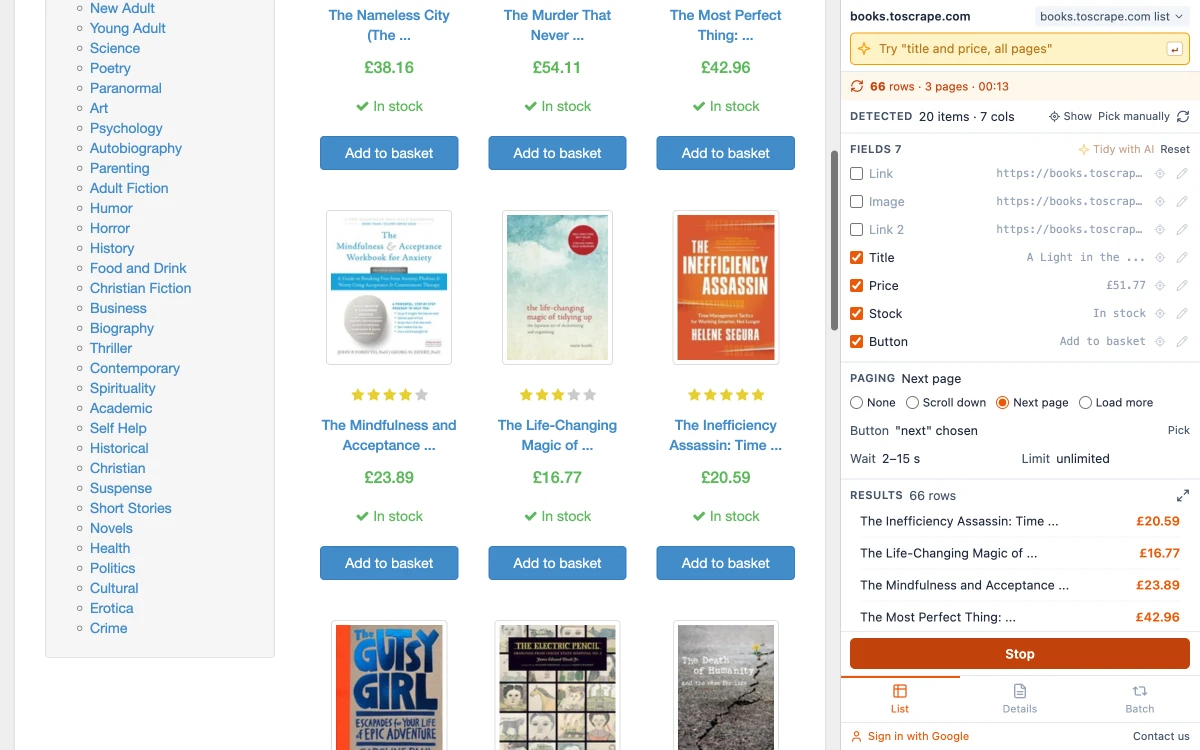
Reading the rows themselves is a different kind of job. Once you know that every book on a page is one block and the price is a particular element inside it, a rule returns all 20 prices on the page, and the same 20 if you run it again. A language model asked to read the same page does far more work to reach the same answer, with three downsides:
- Speed. A rule reads a page in a fraction of a second. A model typically takes seconds per page.
- Cost. Cloud models are billed by the amount of text they process, so the bill grows with every page. Tools built on them pass that on as credits or page limits.
- Accuracy you cannot assume. A model can skip a row, merge two, or tidy a value in a way you did not ask for. On 20 rows you would notice. On 5,000 you would not.
That does not make AI extraction useless. It is the right tool when pages share no structure: a hundred company sites that each describe their team differently, for instance. For a list of similar items, which is most scraping, rules are the better instrument.
On-device AI and cloud AI
Where the model runs decides who sees your data and who pays for it. A cloud model receives the page content that is sent to it. An on-device model runs on your own computer.
Chrome ships with an on-device model, Gemini Nano, that extensions can use through the Prompt API. Chrome's documentation says: "No data is sent to Google or any third party when using the model." It costs nothing per use, and after the first download it works without a connection.
The catch is hardware. Chrome's stated requirements are:
- Windows 10 or 11, macOS 13 or later, Linux, or a Chromebook Plus. Phones are not supported.
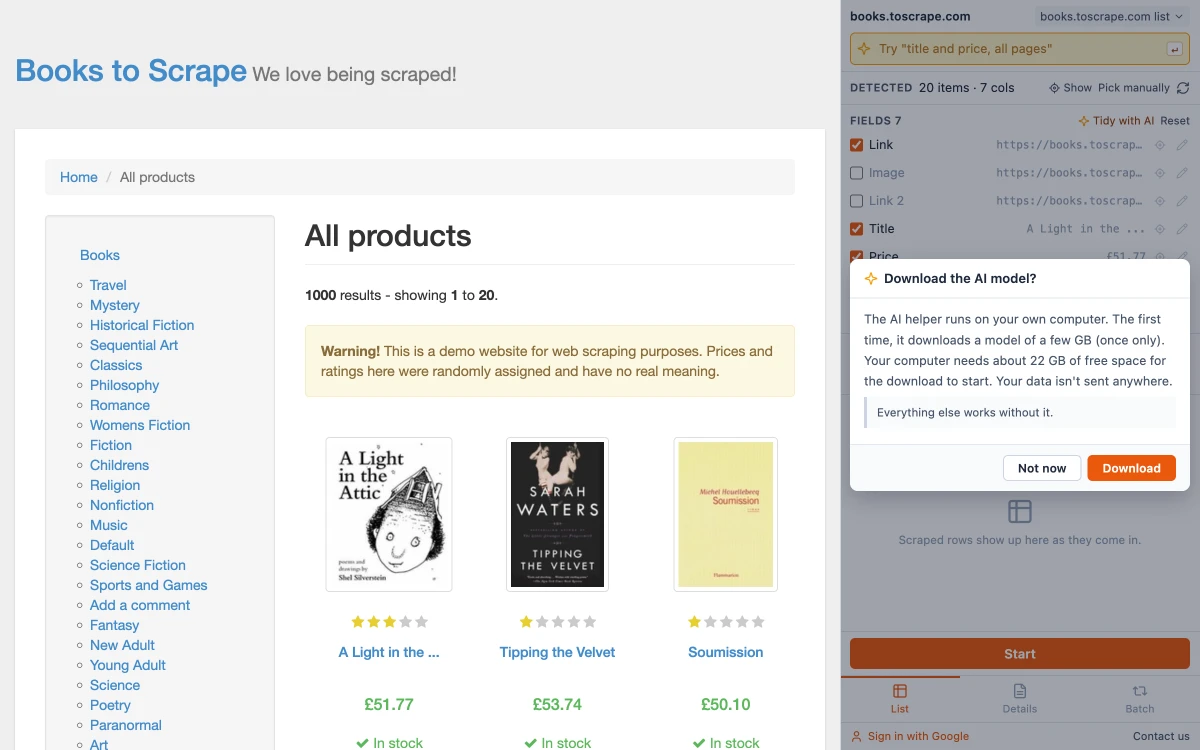
- At least 22 GB of free space on the drive that holds your Chrome profile. If free space later falls below 10 GB, Chrome removes the model.
- A graphics card with more than 4 GB of video memory, or 16 GB of RAM and at least 4 CPU cores.
- An unmetered connection for the one-time model download.
An on-device model is also smaller than the cloud ones. It suits short, narrow questions such as "which of these three candidates is the product list?" and is a poor fit for reading long pages.
How Easy Scraper AI uses AI
Easy Scraper AI is the first design in the table: the AI helps with setup and then steps aside. It uses Chrome's on-device model, in these places:
- Close calls. When two lists on a page score almost the same, or the next-page button cannot be told apart by its text, the model is asked to choose. The panel notes that the list was picked by the AI, next to an Undo AI pick button. When the answer is clear, it is not asked at all.
- Tidying the columns. Columns get plain names without any AI (Title, Price, Link). Tidy with AI goes one step further: it looks at a few sample values, gives each column a clearer name and unticks the ones that look like noise. Each change has its own undo.
- A one-line instruction. Type what you want in the bar at the top of the panel, for example "title and price, all pages". Before anything changes, a dialog titled "Check what the AI will change" shows which columns it matched and what else it understood — paging, a row limit, the export format — with Apply and Rephrase.
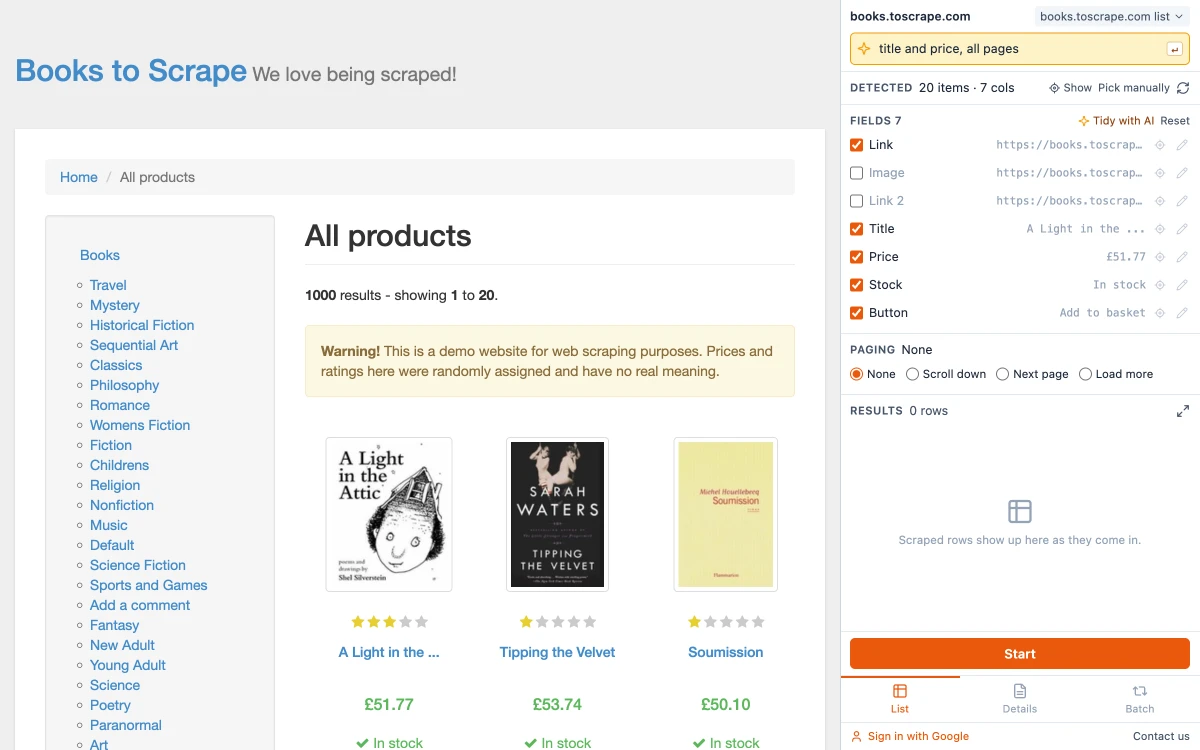
In every case the model chooses from options the extension has already found on the page. It cannot add a column that is not there, and it never touches the rows: the scrape itself runs on rules, so page 50 is read exactly like page 1.
The first time you use the AI helper, the panel asks before Chrome downloads the model, shows the progress and lets you cancel. On a computer or browser that cannot run the model, the AI controls do not appear. If the only thing missing is free disk space, the panel says so instead. Everything else works the same either way.
How to choose
- Your pages are lists of similar items (products, listings, search results, tables): use a rule-based scraper. AI-assisted setup is a convenience, not a requirement.
- Each page is laid out differently: AI extraction earns its cost. Check a sample of the output by hand.
- The task needs many steps across a site (search, filter, open, copy): an agent may do it, but expect to supervise.
- The data is sensitive: prefer tools that keep it on your computer, and read what the tool says about where page content is sent.
Whichever you pick, test it on a page where you already know the right answer, and count the rows. For specific products and prices, see the comparison of Chrome scraper extensions. If the term itself is new to you, start with what web scraping is.
Sources
- The Prompt API, Chrome for Developers: hardware requirements and data handling, checked October 5, 2026
- Built-in AI, Chrome for Developers
Common questions
Yes. Easy Scraper AI is free, and its AI features use Chrome's on-device model, so there are no credits to run out. Cloud AI scrapers usually give a small free allowance and charge beyond it.
Keep reading
Best Web Scraper Chrome Extensions in 2026: 5 Compared
Five extensions, what each is good at and where each stops, taken from their own listings and pricing pages.
Read articleWhat Is Web Scraping? How It Works and What It Is Used For
Web scraping means collecting the data shown on web pages into a structured file. How it works, shown on a real page, and five ways to do it.
Read articleHow to Extract Data from a Website to Excel
Three ways to turn a list or table on any website into an Excel file, shown on a real example with the exported data.
Read guideHow to Scrape Multiple Pages Without Code
Follow Next page buttons, Load more buttons and infinite scroll automatically, and collect every item into one table.
Read guide