
What Is Web Scraping? How It Works and What It Is Used For
Easy Scraper AI7 min read
Short answer
Web scraping is the automated collection of data from web pages. A scraper loads a page, finds the elements that hold the data, such as each product in a list, and copies their values into rows and columns. The result is a file you can open in a spreadsheet, instead of a page you can only read.
On this page
How web scraping works
Every web page is a document made of nested elements: headings, links, images, table cells. Your browser turns that document, called the DOM, into what you see. A scraper reads the same document and keeps only the parts you ask for.
On a page that lists things, each item is built from the same template. On the practice site books.toscrape.com, every book is a block with the same parts in the same order: a cover, a title, a price, a stock label. That repetition is what makes scraping possible. The work comes down to five steps:
- Load the page, either by opening it in a browser or by requesting it from a program.
- Find the repeating items: one rule, called a selector, that matches every book and nothing else.
- Read the fields inside each item: title, price, link. Each becomes a column.
- Go to the next page and repeat until there are no more pages.
- Save the rows as CSV or JSON, or paste them into a spreadsheet.
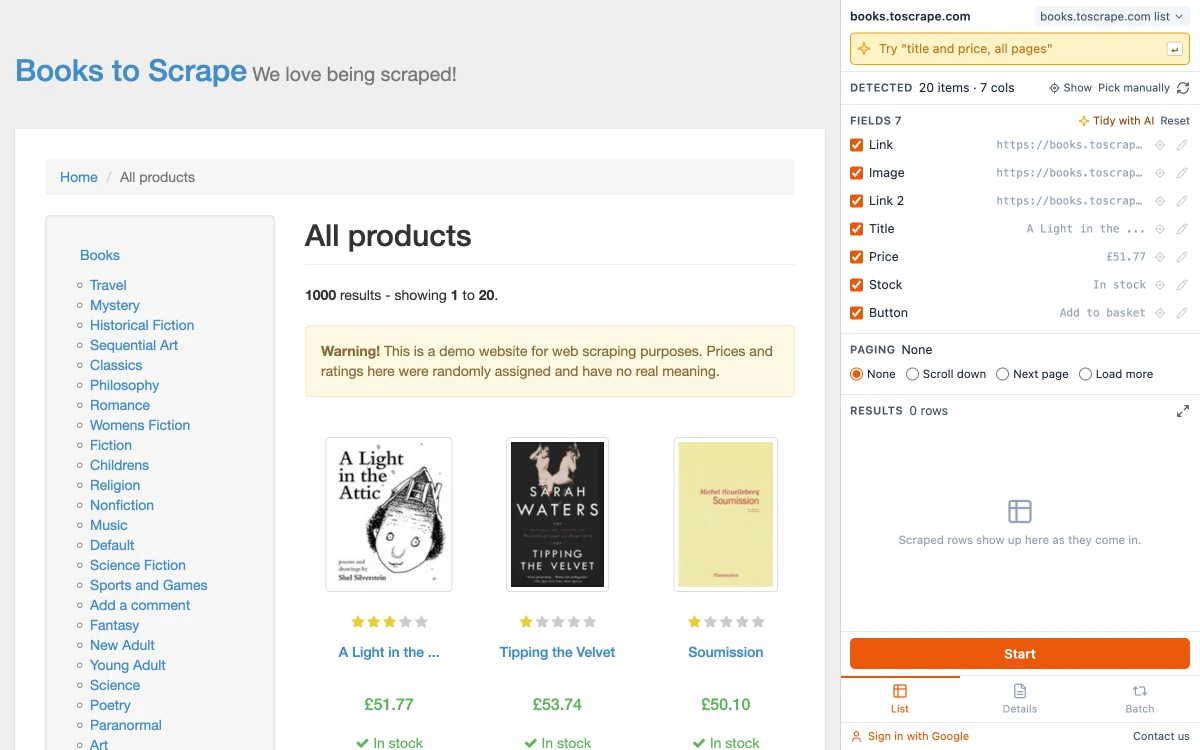
Here are the first rows of the file that came out of that catalog. On the page they were cards in a grid. In the file they are rows:
| Title | Price | Stock |
|---|---|---|
| A Light in the ... | £51.77 | In stock |
| Tipping the Velvet | £53.74 | In stock |
| Soumission | £50.10 | In stock |
| Sharp Objects | £47.82 | In stock |
| Sapiens: A Brief History ... | £54.23 | In stock |
Two things in that table are typical of real scraping. The column names are worked out by the tool from what each column holds — the page's own code calls them product_pod and price_color — and you can change them. And the first title is cut short, because that is how the site prints it in the list. The full title is on each book's own page, which is what scraping a list of URLs is for.
What web scraping is used for
- Price monitoring. Shops and sellers track what competitors charge. The price scraping guide shows a small example.
- Market and academic research. Product listings, job ads and property listings are collected to study a market over time.
- Company lists. A business directory becomes a spreadsheet of company names, categories and websites.
- Moving your own data. Getting your orders, listings or posts out of a site that has no export button.
- Feeding other tools. A table on a page becomes the input for a chart, a report or a Google Sheet.
Five ways to scrape a website
| Method | Skill needed | Good for | Where it stops |
|---|---|---|---|
| Copy and paste | None | One small table, once | Card lists lose their layout; every page has to be done by hand |
| Spreadsheet formulas | Basic formulas | A simple table that should refresh by itself | Cannot read pages built by JavaScript or pages behind a login |
| Browser extension | None | Lists, tables and multi-page results you can open in your browser | Runs on your computer while the tab is open |
| Code | Programming | Full control, schedules, large volumes | You write it and fix it when the site changes |
| Cloud service or API | Some setup | Large or recurring jobs without running anything yourself | Paid by volume; the data passes through a third party |
In Google Sheets the formula is IMPORTHTML. In Python the usual libraries are Beautiful Soup for reading HTML, Scrapy for crawling many pages and Playwright for pages that need a real browser.
Most people who do not program start at the top of the table and move down only when a method stops working. For the third row, see the five scraper extensions compared.
Scraping, crawling and APIs
| Term | What it means | Example |
|---|---|---|
| Web scraping | Extracting specific data from pages | Titles and prices from a category page |
| Web crawling | Following links to discover pages | A search engine bot going from link to link |
| API | A structured feed a site offers to programs | A shop returning its product list as JSON |
They are often combined: a crawler finds the pages and a scraper reads them. When a site offers an API with the data you need, use it. It is more stable than scraping, and it is the door the site intends programs to use.
What makes a page hard to scrape
- Content loaded by JavaScript. The first HTML is nearly empty and the data arrives afterwards. Tools that only fetch the HTML see nothing; tools that run in a real browser see what you see.
- Pagination and infinite scroll. The data is spread over many pages or appears as you scroll. See how to scrape multiple pages.
- Details on separate pages. The list shows a summary and the full record is one click deeper.
- Logins. A program outside your browser is not logged in. An extension works inside the session you already have.
- Blocks and rate limits. Sites limit automated traffic. Going slowly and stopping when asked is both polite and practical.
- Layout changes. A redesign changes the template, and rules written for the old one stop matching.
Is web scraping allowed?
Reading public pages is not illegal in itself, but personal data, copyrighted content, a site's terms and the load you put on its servers all matter. Many sites also publish a robots.txt file that says which parts automated visitors should stay out of. It is a convention rather than a law, and following it is good practice. The details, with court rulings, are in Is web scraping legal?
Try it in two minutes
- Add Easy Scraper AI to Chrome and open books.toscrape.com, a site built for practising.
- Click the extension icon. The side panel shows the detected list: 20 items with their fields.
- Press Start, then CSV.
The full walkthrough, with a screenshot of each step, is in how to extract data from a website to Excel.
Sources
- Introduction to the DOM, MDN Web Docs
- RFC 9309: Robots Exclusion Protocol, IETF, September 2022
- IMPORTHTML, Google Docs Editors Help
- Beautiful Soup, Scrapy and Playwright project sites
Common questions
Copying data from web pages into a table automatically, instead of by hand.
Keep reading
AI Web Scrapers: What the AI Actually Does
"AI web scraper" covers three different designs. What each one does with AI, what it costs you, and how to tell which one you need.
Read articleIs Web Scraping Legal? What the Law Actually Looks At
Scraping public pages is not illegal in itself. What matters is what you collect, whether you agreed to terms that forbid it, and how you go about it.
Read articleHow to Extract Data from a Website to Excel
Three ways to turn a list or table on any website into an Excel file, shown on a real example with the exported data.
Read guideHow to Scrape Multiple Pages Without Code
Follow Next page buttons, Load more buttons and infinite scroll automatically, and collect every item into one table.
Read guide